If you are wondering where to sell digital products, you are not alone. Choosing a platform is one of the most important decisions you will make, because each one has different buyers, fees, tools and rules.
This guide compares the most popular options, explains who each one suits and helps you choose your first platform, so you can start selling with confidence.
The quick answer: marketplaces such as Etsy and Amazon KDP bring buyers who are already shopping, while creator storefronts such as Stan Store, Gumroad and Payhip let you sell directly from your social media bio link. Start where your buyers already search, then add your own website as you grow.
In this guide
- Marketplaces vs Your Own Storefront
- Popular Platforms Compared
- Marketplaces in More Detail
- Creator Storefronts for Selling From Social Media
- Your Own Website and Course Platforms
- Check the Fees Before You Set Your Price
- How to Choose Your First Platform
- Delivery and Access: Test Before You Launch
- Where to Sell Digital Products FAQ
1. Marketplaces vs Your Own Storefront
There are two broad places to sell: marketplaces, where buyers already come to shop, and your own storefront, where you bring the buyers yourself.
Marketplaces
You get built-in traffic, but more competition and less control.
Your own storefront
You get more control and better margins, but you are responsible for every visitor. Many successful sellers use both.
2. Popular Platforms Compared
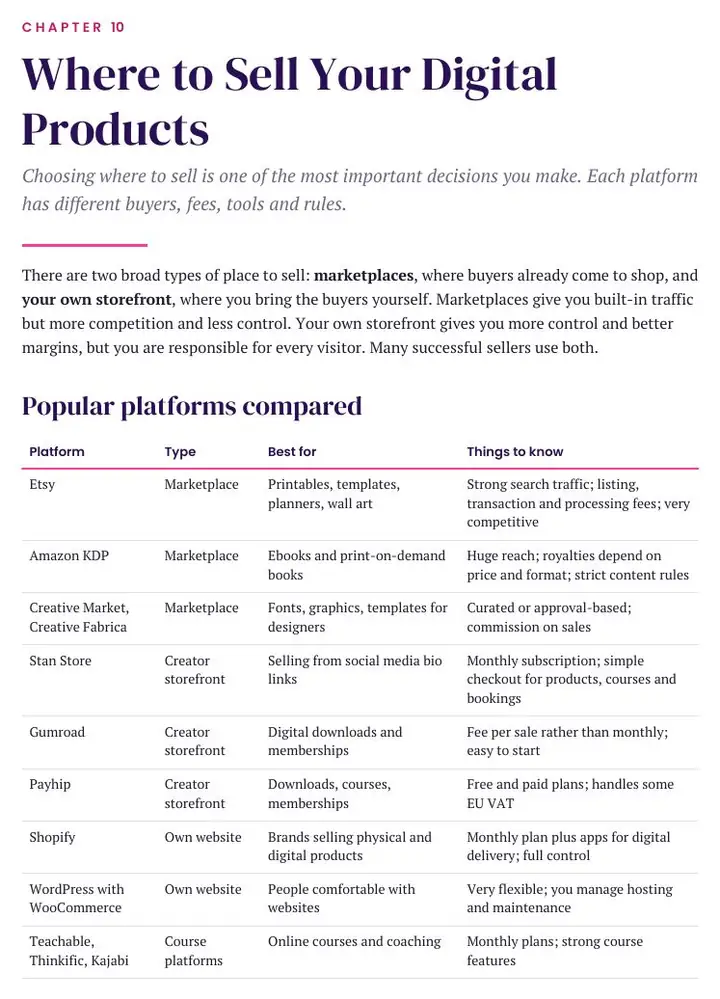
| Platform | Type | Best for |
|---|---|---|
| Etsy | Marketplace | Printables, templates, planners, wall art |
| Amazon KDP | Marketplace | Ebooks and print-on-demand books |
| Creative Market, Creative Fabrica | Marketplace | Fonts, graphics and templates for designers |
| Stan Store | Creator storefront | Selling from social media bio links |
| Gumroad | Creator storefront | Digital downloads and memberships |
| Payhip | Creator storefront | Downloads, courses and memberships |
| Shopify | Own website | Brands selling physical and digital products |
| WordPress with WooCommerce | Own website | People comfortable with websites |
| Teachable, Thinkific, Kajabi | Course platforms | Online courses and coaching |
| Skool | Community platform | Paid communities with courses |
3. Marketplaces in More Detail
Etsy
Strong search traffic and a good fit for printables, templates and planners. It is also very competitive, with listing, transaction and processing fees.
Amazon KDP
Huge reach for ebooks and print-on-demand books. Royalties depend on price and format, and the content rules are strict. Our guide on how to create and sell an ebook covers the basics.
Creative marketplaces
Sites such as Creative Market and Creative Fabrica suit fonts, graphics and templates. They are curated or approval-based and take a commission.
4. Creator Storefronts for Selling From Social Media
If you already have followers, a creator storefront lets you sell directly from your bio link, with less competition on the page.
- Stan Store: a monthly subscription with simple checkout for products, courses and bookings.
- Gumroad: a fee per sale rather than a monthly fee, and easy to start.
- Payhip: free and paid plans, and it handles some EU VAT.
My own digital products are sold this way. To bring visitors to your store, see how to sell digital products on TikTok.
5. Your Own Website and Course Platforms
As you grow, add your own website so you are not dependent on any single platform’s rules or algorithms.
- Shopify: a monthly plan plus apps for digital delivery, with full control.
- WordPress with WooCommerce: very flexible, but you manage hosting and maintenance.
- Teachable, Thinkific and Kajabi: strong course features on monthly plans.
- Skool: a community-first platform for paid communities with courses.
6. Check the Fees Before You Set Your Price
Fees change often. At the time of writing, Etsy charged UK sellers a listing fee of about 15p per item, a 6.5% transaction fee and payment processing of 4% plus 20p, plus a small regulatory fee and VAT on fees. Every platform’s fees change, so always check the current fee page.
Work out your profit per sale before you set your prices, so you know exactly how much you would keep.
7. How to Choose Your First Platform
- No audience yet? Start where buyers already search: Etsy for printables and templates, Amazon KDP for books, a creative marketplace for design assets.
- Already have followers? Use a creator storefront such as Stan Store, Gumroad or Payhip.
- Growing? Add your own website for control and better margins.
Try this: choose your first platform using the table above, read its seller policies and fee page in full, and work out how much you would keep from a sale at your planned price.
8. Delivery and Access: Test Before You Launch
Most platforms deliver digital files automatically after purchase. Check file size limits, how many files you can attach and how buyers access their downloads later.
For Canva, Notion or Google templates, the product is usually a PDF containing access links and instructions. Always test the full purchase and download process yourself before launching.
9. Where to Sell Digital Products FAQ
Where is the best place for a beginner to sell digital products?
Start where your buyers already search. That is usually Etsy for printables and templates, and Amazon KDP for books. If you have followers, a creator storefront works well.
Can I sell on more than one platform?
Yes. Many successful sellers use a marketplace and their own storefront together.
Do I need my own website?
Not at first. Add one as you grow so you are not dependent on any single platform.
How do I get customers once I have a store?
Share useful content on social media. See our guides on TikTok and Instagram.
Are the fees the same for every platform?
No. Fees vary and change often, so always check each platform’s current fee page. Results vary, and no income is guaranteed. See our Earnings Disclaimer.
Keep learning: learn how to create and sell an ebook, read affiliate marketing for beginners, or browse all my digital products.
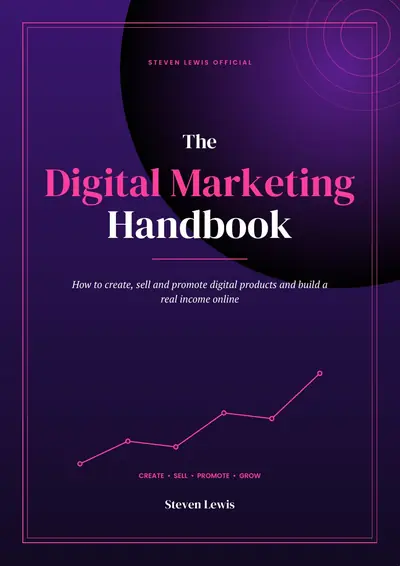
THE DIGITAL MARKETING HANDBOOK
Want the Full Digital Product Roadmap?
The handbook covers choosing platforms, pricing, sales pages, marketing and UK rules in one clear guide.
- 58 pages and 21 chapters
- Create, sell and promote digital products
- A 90-day action plan
- Digital download